UpLead vs Disburse for Building Targeted B2B Lead Lists
16 min readLachlan McBride White
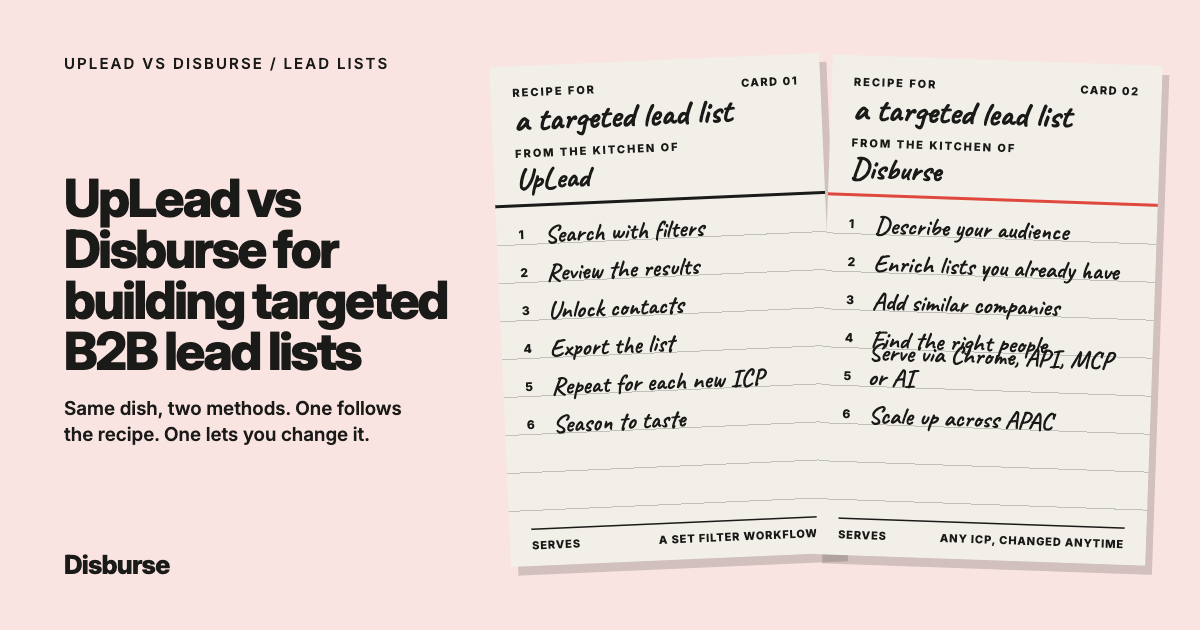
UpLead and Disburse can both help sales teams build targeted B2B lead lists.
But they suit different ways of prospecting.
UpLead follows a more traditional database workflow.
You:
Search → filter → review → unlock → export
Disburse is built around a more flexible B2B data workflow.
You can:
Describe the audience you want in natural language
Find one person or thousands
Enrich an existing contact or company list
Find companies similar to a strong customer
Identify the right people inside those businesses
Work through Chrome
Connect through REST
Connect through MCP
Use B2B data inside AI workflows
The short answer: UpLead is a good fit if you want a familiar filter-and-export database with a strong focus on verified contact data.
Disburse is likely the better fit if you want targeted list building to be easier to adapt, especially if you regularly change ICPs, enrich existing data, use AI, prospect across APAC or need much larger data volumes.
UpLead vs Disburse at a glance
Feature
Build targeted B2B lead lists
Disburse:
Yes
UpLead:
Yes
Find one specific person
Disburse:
Yes
UpLead:
Yes
Find companies
Disburse:
Yes
UpLead:
Yes
Natural-language search
Disburse:
Yes
UpLead:
More traditional filter-led search
Business emails
Disburse:
Yes
UpLead:
Yes
Phone numbers
Disburse:
Yes
UpLead:
Yes
LinkedIn URLs
Disburse:
Yes
UpLead:
Yes
Company data
Disburse:
Yes
UpLead:
Yes
Enrich existing contacts
Disburse:
Yes
UpLead:
Yes
Enrich company records
Disburse:
Yes
UpLead:
Yes
CSV enrichment
Disburse:
Yes
UpLead:
Yes
Find similar companies
Disburse:
Yes
UpLead:
Not a core workflow
Find relevant personas
Disburse:
Yes
UpLead:
Yes
Chrome extension
Disburse:
Yes
UpLead:
Yes
REST / API access
Disburse:
Yes
UpLead:
Yes
MCP
Disburse:
Yes
UpLead:
Not a core native workflow
AI workflows
Disburse:
Yes
UpLead:
More API-led
High-volume self-service
Disburse:
Yes
UpLead:
More limited
Best suited to
Disburse:
Flexible list building, enrichment and AI workflows
UpLead:
Traditional B2B contact search and export
How does UpLead build targeted B2B lead lists?
UpLead uses a conventional B2B database model.
A sales rep typically:
Sets filters.
Reviews matching companies or people.
Unlocks the contacts they want.
Exports the results.
Filters can narrow the audience by criteria such as:
Job title
Company size
Industry
Geography
Revenue
Seniority
Technologies
That works well for teams that are comfortable with standard B2B databases and already know how they want to segment their market.
It is familiar and relatively easy to understand.
How does Disburse build targeted B2B lead lists?
Disburse can start with the audience itself.
For example:
“Find founders of Australian B2B SaaS companies with 20 to 100 employees.”
Or:
“Find Heads of Sales at Singaporean fintech companies with more than 50 employees.”
Or:
“Find Managing Directors at recruitment agencies in Australia and New Zealand.”
The request can combine person, company and geographic criteria such as:
Job title
Seniority
Job function
Industry
Revenue
Employee count
Geography
Company specialties
Email availability
Phone availability
The search feels more like describing your ICP than constructing a database query.
Which is easier if you already know your ICP?
Disburse is likely easier.
Suppose your team already knows:
“We sell to Australian software companies with 20 to 100 employees, and the founder is usually the buyer.”
With Disburse, that can become the search almost word for word:
“Find founders of Australian software companies with 20 to 100 employees.”
You do not need to translate the ICP into separate database fields before you start.
UpLead can absolutely build the same audience.
The process is simply more traditional.
For some teams, that is ideal.
For others, translating the ICP into filters adds unnecessary friction.
Which is better for very specific targeting?
Both can work well.
UpLead’s structured filters are useful when you want precise control over individual fields.
Disburse is especially useful when you want to express that same targeting naturally.
For example:
“Find CFOs at Australian professional-services firms with 100 to 500 employees.”
Or:
“Find founders of cybersecurity businesses in Singapore and Hong Kong with 20 to 100 employees.”
The difference is less about whether the audience can be built and more about how naturally the team gets there.
Can Disburse build small and large lead lists?
Yes.
Disburse does not require you to build a huge audience.
You can search for:
1 person
10 people
100 people
or
5,000 people
The same basic workflow applies.
That matters because real sales prospecting is rarely consistent.
A salesperson might need one decision-maker today and thousands of prospects for a campaign next week.
Can UpLead find one person too?
Yes.
UpLead can also find and unlock a single professional contact.
This is not a meaningful distinction between the platforms.
Both can handle individual contact lookup.
The more useful question is how easily the workflow changes when you move from one person to a broader target market.
Which is better if your ICP changes frequently?
Disburse has a strong advantage here.
Suppose an agency or sales team is testing several audiences.
First:
“Australian SaaS founders with 10 to 50 employees.”
Then:
“Singaporean fintech Heads of Sales with 50 to 200 employees.”
Then:
“New Zealand recruitment Managing Directors.”
With Disburse, the user simply changes the request.
UpLead can also target each of those audiences.
But the team may need to rebuild or adjust the filter set each time.
For businesses constantly testing new markets and ICPs, that difference can matter.
Which is better for building lists from existing data?
Both can do this.
You do not always need to start with a blank search.
Disburse can enrich existing contact and company data.
For example, you could upload a CSV containing more than 2,000 contacts and use identifiers such as email addresses to match the records and add available person and company information.
That means a lead-generation project might begin with:
“We already have the names. We need better data.”
UpLead also supports enrichment.
So enrichment itself is not unique to Disburse.
The difference is that Disburse can move naturally between enrichment and other workflows such as:
Natural-language discovery
Similar-company discovery
Persona finding
Which is better for building lists from your best customers?
Disburse has the clearer advantage.
Sometimes the best description of your ICP is:
“Find more businesses like these.”
Disburse can identify companies similar to a target account and then find relevant people inside them.
For example:
“Find Australian companies similar to this SaaS business, then find the founders.”
Or:
“Find companies similar to these three customers in Australia and Singapore, then identify the Heads of Sales.”
That can be easier than trying to reverse-engineer exactly why those companies are strong customers and rebuild the logic through filters.
Does UpLead support similar-company prospecting?
UpLead has company and competitive intelligence capabilities, and higher-tier features can support related-company and lookalike-style research.
But this is not as central to the workflow as it is in Disburse.
For teams that regularly begin prospecting with examples of strong customers, Disburse is likely to feel more natural.
Which is better for finding the right person at each company?
Both can do this.
UpLead can filter contacts using:
Title
Seniority
Role criteria
Disburse lets you describe the persona directly.
For example:
“Find the Head of Operations at each of these companies.”
Or:
“Find the founder at every company similar to this customer.”
That becomes particularly useful when company discovery and person discovery happen together.
Which is better for email and phone data?
Both are competitive.
UpLead uses a straightforward contact model where one credit unlocks a contact and can include the available email and mobile direct dial.
Disburse uses a similar lead-centric model:
One credit = one lead.
Available mobile numbers do not require additional credits.
So this is not a comparison where one provider charges heavily for phone data and the other does not.
The larger differences are:
Volume
Workflow
Pricing
AI access
Which is better for complete prospect records?
Both can provide useful company and contact data.
A complete B2B prospect record may include:
Name
Role
Company
Business email
Phone number
LinkedIn URL
Industry
Employee count
Revenue
Location
Disburse becomes particularly useful when that record is generated from:
A natural-language request
An enrichment workflow
Similar-company discovery
UpLead is strong when you prefer a classic search-and-unlock workflow.
Which is better for browser-based prospecting?
Both have Chrome extensions.
So browser access itself is not a major differentiator.
The better comparison is what happens beyond the browser.
Can the platform:
Build a target audience from a prompt?
Enrich thousands of existing records?
Find similar companies?
Identify relevant personas?
Work inside an AI agent?
Scale economically to larger data volumes?
That is where Disburse’s broader flexibility starts to stand out.
Which is better for APAC lead generation?
Disburse is particularly relevant for teams working across APAC.
For example:
“Find founders of Australian B2B SaaS companies.”
“Find Heads of Sales at Singaporean fintech businesses.”
“Find Managing Directors at New Zealand engineering firms.”
“Find CFOs at Hong Kong professional-services companies.”
The same basic workflow works across each market.
UpLead also has global coverage.
So it would be inaccurate to assume one database always has better APAC data.
The best approach is to test both using your actual ICP.
Compare:
Relevant companies
Correct decision-makers
Email coverage
Phone coverage
Company information
Accuracy
Total usable records
Cost
For APAC sales teams, actual regional performance matters more than global database-size claims.
Which is better for small sales teams?
Disburse is particularly compelling for small teams that need more than a few hundred contacts.
Disburse pricing
Plan
Free
Monthly price:
A$0
Monthly credits:
50
Team members:
1
Growth
Monthly price:
A$20
Monthly credits:
5,000
Team members:
Up to 5
Scale
Monthly price:
A$99
Monthly credits:
50,000
Team members:
Unlimited
Enterprise
Monthly price:
Custom
Monthly credits:
Custom
Team members:
Custom
One credit represents one lead.
Available mobile numbers do not cost additional credits.
UpLead’s self-service plans are priced higher for smaller monthly contact allowances.
That can still make sense when a team places a high value on UpLead’s verification model.
But for a smaller sales team that needs substantial volume, the difference becomes significant.
Which is better for agencies?
Disburse has a particularly strong fit for agencies because each client can create a different data problem.
One client may need:
“Find the Managing Director at these 50 companies.”
Another:
“Build a list of 1,000 Australian SaaS founders.”
Another:
“Enrich these 2,000 existing records.”
Another:
“Find businesses similar to our top customers and the right people inside them.”
Those are different workflows.
But they all sit within the same B2B data layer.
For agencies handling multiple ICPs, that flexibility can be more useful than a fixed search-and-export process.
Which is better for recruiters?
Both can work well.
A recruitment business could use UpLead to find professional contacts and export them.
Disburse can do the same but can also move between:
Individual contact research
Market mapping
Enrichment
Similar-company discovery
Persona finding
For example:
“Find Heads of Talent at Australian technology companies with 100 to 500 employees.”
Or:
“Find businesses similar to our best recruitment clients and identify their Managing Directors.”
This can be particularly useful for recruiters using B2B data for both market mapping and business development.
Which is better for AI-generated lead lists?
Disburse has the stronger proposition here.
It provides REST and MCP.
That means an AI assistant or agent can request B2B data directly.
For example:
“Find 500 founders of Australian SaaS companies.”
“Find the Head of Sales at these companies.”
“Enrich this uploaded file.”
“Find companies similar to these customers.”
UpLead provides API access and can also be used programmatically.
The difference is that MCP and conversational B2B data access are more central to Disburse.
Which is better for developers?
Both can work.
UpLead provides API functionality for prospecting and enrichment.
Disburse provides:
REST
MCP
That makes Disburse particularly relevant for developers building:
AI agents
Internal sales tools
Custom prospecting software
Enrichment workflows
SaaS applications
For standard API integrations, either may work.
When AI is a core part of the interface, Disburse has a particularly natural fit.
Which is better for high-volume list building?
Disburse has a clear advantage in self-service volume.
Plan
Free
Monthly price:
A$0
Monthly credits:
50
Growth
Monthly price:
A$20
Monthly credits:
5,000
Scale
Monthly price:
A$99
Monthly credits:
50,000
UpLead’s self-service plans provide much smaller monthly contact allowances.
Price is not everything.
One provider may perform materially better for a particular ICP.
But for teams building targeted lists in the thousands rather than hundreds, the economics matter.
Which is better for testing new markets?
Disburse is particularly useful.
Searching is unlimited.
That allows teams to test different ICPs before deciding which contacts to retrieve.
For example:
Australia
“Founders of B2B SaaS companies with 10 to 50 employees.”
Singapore
“Heads of Sales at fintech companies with 50 to 200 employees.”
New Zealand
“Managing Directors of recruitment businesses.”
The prospecting process does not have to be rebuilt every time the market changes.
Which is easier for non-technical sales teams?
Disburse is likely easier for users who think about the market rather than database fields.
A salesperson can describe the audience the way they understand it.
For example:
“Find Australian software founders at companies with 20 to 100 employees.”
UpLead is also straightforward.
But it assumes the user is comfortable translating the ICP into filters.
For some salespeople, that is no problem.
For others, natural language removes an unnecessary step.
Which is better if you already have a sales stack?
Disburse is particularly attractive here.
If you already use:
A CRM
An outbound email platform
A dialler
LinkedIn
Automation software
AI tools
you may not need your data provider to become another large part of your sales workflow.
You simply need the B2B data.
Disburse can feed that data into the tools you already use.
UpLead can also integrate with CRMs and other external systems.
The difference is how flexible you need the underlying data workflow to be.
Which has better accuracy?
There is no credible universal winner.
UpLead places strong emphasis on real-time email verification and publicly promotes high data accuracy.
Actual performance can still vary by:
Geography
Role
Industry
Company size
Seniority
Contact freshness
The best comparison is to run your real ICP through both platforms.
For APAC teams, test the Australian, New Zealand, Singaporean or other regional contacts you genuinely intend to use.
Which has simpler pricing?
Both use relatively straightforward credit models.
UpLead uses:
One credit per unlocked contact.
Disburse uses:
One credit per lead.
Available mobile numbers do not cost extra with Disburse.
The bigger difference is the amount of data included at each price point.
For teams building targeted lists at scale, that can materially affect the buying decision.
Where is UpLead stronger?
UpLead has several genuine strengths.
It offers:
A familiar traditional database workflow
Strong focus on real-time email verification
Mobile direct dials
Enrichment
Chrome extension access
CRM integrations
Technographic filters
Structured prospecting
For a team that wants a conventional verified database and only needs moderate contact volumes, UpLead is a solid choice.
Where is Disburse stronger?
Disburse is stronger when the workflow needs to be more flexible.
You can start with:
One person
An ICP
An existing list
A target company
A similar-company request
A browser workflow
An API request
An AI assistant
Then use the same platform to find or enrich the relevant person and company data.
It also provides high self-service data volumes at a low price point.
For teams that regularly:
Change audiences
Enrich existing data
Test new markets
Use AI workflows
that combination is particularly strong.
When should you choose UpLead?
UpLead is likely a good fit if:
You prefer traditional filters
Verified email workflows are a priority
You need moderate monthly contact volumes
Technographic filtering matters
You want a familiar search, unlock and export process
Its data performs particularly well for your target market
When should you choose Disburse?
Disburse is likely the better fit if:
You regularly build targeted B2B lead lists
You also find individual contacts
Natural-language search matters
You enrich existing contact and company data
You work with CSVs
You want similar-company discovery
You need persona finding
You prospect across APAC
You use a Chrome extension
You need REST
You use MCP
AI workflows matter
You have multiple team members
You need larger monthly contact volumes
You want the data to fit around your existing sales stack
UpLead vs Disburse: which is better for building targeted B2B lead lists?
UpLead is a good B2B contact database.
If your sales team is comfortable with traditional filters, wants strong email verification and only needs a few hundred carefully selected contacts each month, it can be a sensible choice.
But targeted prospecting is increasingly less linear than:
Filter → unlock → export
A team might start with an ICP.
Then enrich an existing file.
Then discover that three customers are particularly strong fits and want to find similar companies.
Then ask an AI assistant to identify the right personas across those accounts.
Disburse is built to move between those jobs without forcing the team into separate tools or workflows.
That makes it particularly compelling for:
Agencies
Founders
Smaller sales teams
APAC-focused businesses
Teams whose ICP changes frequently
The volume difference strengthens the proposition further.
For teams that primarily need B2B data and expect to work with thousands of records rather than hundreds, Disburse is likely the better fit.
UpLead remains strong if its verification-focused traditional database workflow is exactly what your team wants.
The decision ultimately comes down to whether you want:
A conventional database for building prospect lists
or
A more flexible B2B data platform that can keep adapting as the question changes.
Frequently asked questions
Is Disburse better than UpLead for building lead lists?
Disburse is likely the better fit for teams that value:
Natural-language prospecting
Enrichment
Similar-company discovery
AI workflows
Higher data volumes
UpLead remains a strong traditional contact database.
Can Disburse build small lead lists?
Yes.
Disburse can find one person, a handful of contacts or a much larger target audience.
Can UpLead build targeted lists?
Yes.
UpLead supports detailed person and company filters for building targeted prospect lists.
Can Disburse search in natural language?
Yes.
Users can describe the companies and people they want directly.
Can Disburse enrich existing lists?
Yes.
Existing contact and company datasets can be enriched with additional available information.
Can Disburse enrich a CSV with thousands of contacts?
Yes.
Large uploaded CSV files can be used as the starting point for enrichment.
Can UpLead enrich existing lists?
Yes.
UpLead provides contact and company enrichment capabilities.
Can Disburse find similar companies?
Yes.
Disburse can identify companies similar to a target business and then find relevant personas within those companies.
Can Disburse find one person?
Yes.
It can be used for individual contact search as well as larger audiences.
Which is better for email data?
Both can be strong.
UpLead places particular emphasis on real-time email verification.
Disburse combines available email data with broader natural-language, enrichment and AI workflows.
Which is better for phone data?
Both use relatively straightforward contact-based models.
Disburse does not charge an additional credit for available mobile data.
Which is better for APAC lead generation?
Disburse is particularly relevant for teams prospecting across Australia, New Zealand, Singapore and wider APAC.
Actual data quality should still be tested against your specific market and ICP.
Which is better for agencies?
Disburse is particularly useful for agencies because it can move between:
Targeted list creation
Individual research
Enrichment
Similar-company discovery
across different client briefs.
Which is better for recruiters?
Both can work.
Disburse becomes particularly useful where recruitment teams also need:
Market mapping
Existing-data enrichment
Business-development prospecting
in addition to contact lookup.
Which is better for AI workflows?
Disburse has the stronger AI-native proposition because it supports REST and MCP and can handle several B2B data tasks through conversational workflows.
Which is better for high-volume list building?
Disburse is particularly competitive.
Growth includes 5,000 monthly credits.
Scale includes 50,000 monthly credits.
Which is better for small sales teams?
For teams that need greater contact volume and multiple users, Disburse is particularly attractive.
UpLead can make sense for teams that value its traditional verification workflow and need fewer records.
Can Disburse replace UpLead?
For many lead-building and enrichment workflows, yes.
Disburse can cover:
Contact discovery
Company discovery
Enrichment
Similar-company research
Chrome access
REST
MCP
AI workflows
Which should I choose?
Choose UpLead if you prefer a traditional verified contact database and moderate prospect volumes.
Choose Disburse if you want a more flexible B2B data platform with natural-language search, enrichment, AI access and much higher self-service volumes.
APAC Prospectinglead generationSmall Sales TeamsB2B Contact DatabaseAI ProspectingNatural-Language SearchB2B DataSales ProspectingData EnrichmentDisburseB2B Lead ListsSales IntelligenceIdeal Customer Profile (ICP)